How to Customize Your Stream Overlay Template for Different Games
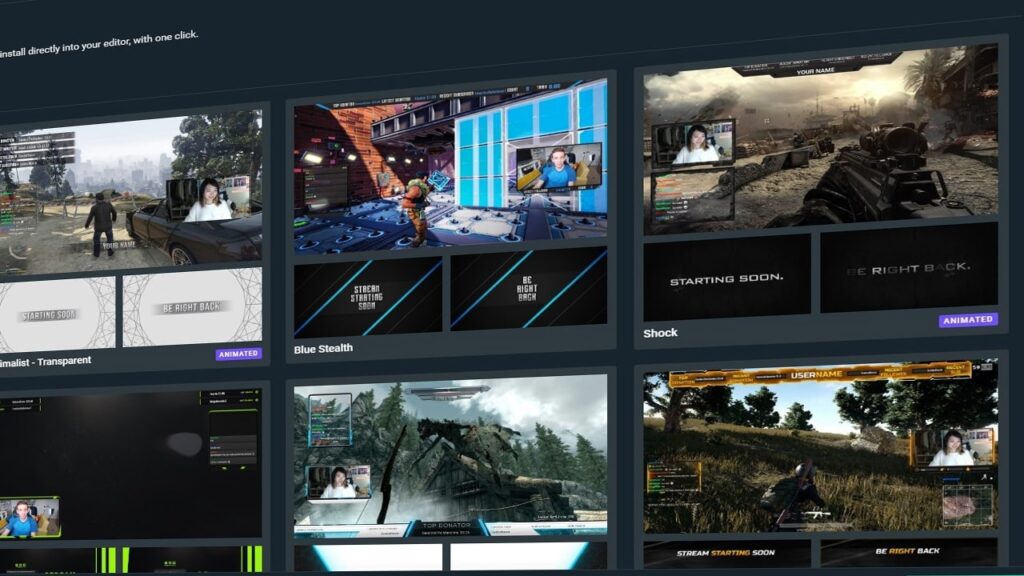
Stream overlays are a crucial element for any streamer, as they help to enhance the overall aesthetic and branding of your channel. A stream overlay template is a pre-designed set of graphics and elements that you can use to create a cohesive look for your stream. While stream overlays are typically created to be used across all of your streams, there may be times when you want to customize your overlay for a specific game or event. Here are some tips for customizing your stream overlay template for different games:
- Determine the purpose of the customization: Before you start customizing your overlay template, it’s important to consider why you’re doing it. Are you trying to match the theme of a specific game or event? Are you looking to create a more immersive experience for your viewers? Knowing the purpose of your customization will help you determine what elements you should add or remove from your overlay template.
- Consider the game’s aesthetics: Every game has its own unique aesthetic, and it’s important to consider this when customizing your overlay template. For example, if you’re streaming a game with a bright and colorful art style, you may want to incorporate more vibrant colors into your overlay template. On the other hand, if you’re streaming a game with a darker and more serious tone, you may want to use more muted colors in your overlay template.
- Add game-specific elements: Depending on the game you’re streaming, you may want to add elements to your overlay template that are specific to that game. For example, if you’re streaming a battle royale game, you may want to add a minimap to your overlay template. Or if you’re streaming a role-playing game, you may want to add character statistics or a quest tracker to your overlay template.
- Use branding and logos: If you’re streaming a game that is part of a franchise or has a strong brand, consider incorporating the game’s branding and logos into your overlay template. This will help to establish a connection between your stream and the game you’re playing, and it can also help to establish your stream as an official source for content related to the game.
- Test and adjust as needed: After you’ve customized your overlay template for a specific game, it’s important to test it out and see how it looks in action. Pay attention to how the elements of your overlay template look in different lighting and background situations, and make adjustments as needed. You may need to make further adjustments as you continue to stream the game and get a feel for how the overlay template works in practice.
Customizing your stream overlay template for different games can help to enhance the overall experience for your viewers and create a more immersive and cohesive look for your stream. By considering the purpose of your customization, the game’s aesthetics, and adding game-specific elements, you can create a stream overlay template that is tailored to the game you’re playing. Check out free stream overlay templates here!
